Release Notes
December 2018
What's New
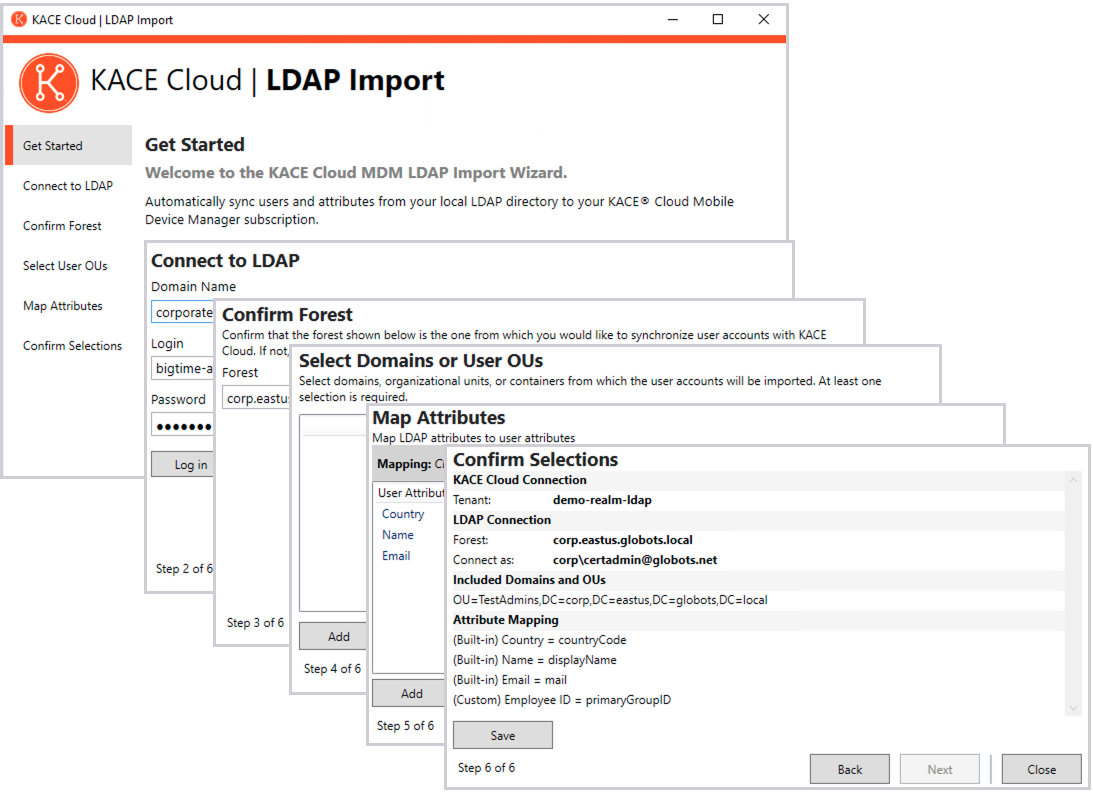
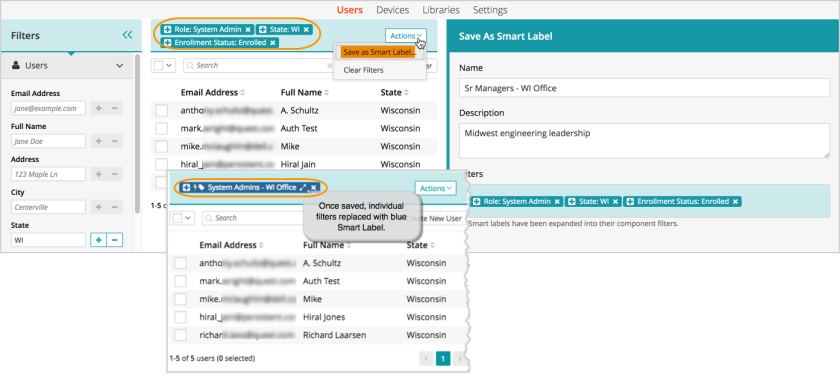
In our December release, we are introducing two new features to KACE® Cloud Mobile Device Manager: Our LDAP Import Tool beta and Smart Labels. The LDAP Import Tool lets administrators import user accounts and sync LDAP user information from their on-prem active directory to KACE Cloud MDM. It’s a quick Wizard setup that lets an admin choose which users and attributes to sync. Smart Labels are the next level of label management in KACE Cloud—allowing you to save a set of filters that will automatically tag multiple devices or users based on the filter criteria.
We are also rolling out new functionality and an improved workflow for managing Restrictions. An admin can now apply device restrictions using pre-configured sets in the restrictions library. This improvement aligns restrictions with the management workflow of all other areas of configuration in KACE Cloud. The restrictions previously managed in KACE Cloud will remain on an end user's device(s)—no automatic changes will take place. However, these individual restrictions can no longer be managed from the Devices section in KACE Cloud. Instead, administrators will now create and manage new restriction sets in the Restrictions Library. Managing restrictions using the library simplifies management and will ensure consistency across devices.
New Feature: LDAP Import Tool beta
With the release of our new LDAP Import Tool, administrators can sync their LDAP user information from their on-prem active directory with KACE Cloud. The import tool is installed to an on-prem network environment—and once installed, allows an admin to sync, customize attributes, and adjust settings. The tool also lets an admin pre-populate KACE Cloud with their user database (customized through selection of specific domains and organizational units), so they can kick off pre-configuration activities for their end users. To get set up with the LDAP Import Tool beta, please contact support.
New Feature: Smart Labels
A smart label is essentially a set of saved filters—it may contain 2 or 3 filter criteria, or it may contain 10. Smart labels automatically include devices or users that meet the label's criteria. When you’re working with a large database of users and devices, these label functions can be a huge efficiency boost. Instructions for each use case can be found in our documentation under Using labels to group similar items.
New Functionality: Restrictions
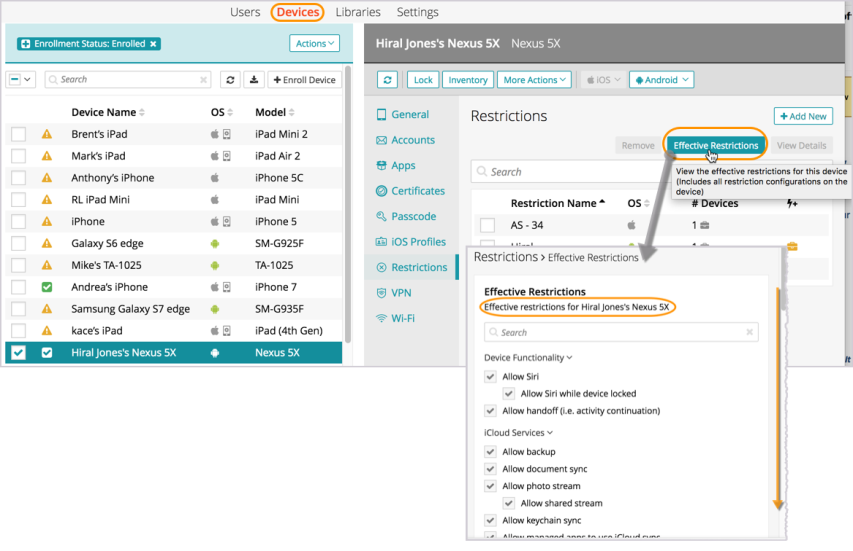
Device restrictions are now managed in the restrictions library, using pre-configured restriction sets. The improved restrictions functionality allows for stacking of multiple restrictions on a device; automatically applying default restriction sets to devices as they are enrolled, and viewing effective restrictions on a given device. Note: Devices with existing restrictions will not experience any automatic changes due to the updated functionality. With the improved workflow, administrators will be able to create, save, and add restriction sets from the library to devices. For additional information on restrictions, see Device Configuration.
Known Issues
Role Management and SSO Configuration
If user role assignment is set to Automatic during SSO Configuration, a manual attempt to update an individual user's role via the Users > Edit User path may appear possible, but will be overwritten by the original SSO Configuration. To resolve, the configuration setting can be changed to Manual, which will then enable editing of individual user roles.
Android-Specific Considerations
Paid App Deployment to Multiple Devices with Same User
When deploying paid apps to devices, if an app is deployed to multiple devices with the same user, the license count that we show will be improperly decremented. Those licenses are still available and going to settings and clicking sync will update the licenses to their true count.
Gmail App
Android devices require the Gmail app to be installed in order to use the email account configurations.
Set and Clear Passcode Commands
The set and clear passcode functions are different in Android N and later. On versions prior to N, an administrator could set or clear the passcode as desired. On Android N and later, the passcode can only be set on devices that do not already have a passcode set, and passcodes cannot be cleared. The user interface does not currently warn users who are attempting to set or clear a passcode on Android N or later, but an error message will appear. Note that attempting to clear a passcode will also fail if there is a policy in place that requires use of a passcode to do so.
iOS-Specific Considerations
Factory Reset - Apple iOS iCloud Account Lock
When resetting an Apple iOS device back to factory defaults, the device will remain locked to the associated iCloud account. To prevent this from happening, before resetting the device, manually turn off the 'Find my phone' feature on the iPhone.
Additional Resources
Getting Started with KACE Cloud MDM
© 2018 Quest Software Inc.
ALL RIGHTS RESERVED.
This guide contains proprietary information protected by copyright. The software described in this guide is furnished under a software license or nondisclosure agreement. This software may be used or copied only in accordance with the terms of the applicable agreement. No part of this guide may be reproduced or transmitted in any form or by any means, electronic or mechanical, including photocopying and recording for any purpose other than the purchaser’s personal use without the written permission of Quest Software Inc.
The information in this document is provided in connection with Quest Software products. No license, express or implied, by estoppel or otherwise, to any intellectual property right is granted by this document or in connection with the sale of Quest Software products. EXCEPT AS SET FORTH IN THE TERMS AND CONDITIONS AS SPECIFIED IN THE LICENSE AGREEMENT FOR THIS PRODUCT, QUEST SOFTWARE ASSUMES NO LIABILITY WHATSOEVER AND DISCLAIMS ANY EXPRESS, IMPLIED OR STATUTORY WARRANTY RELATING TO ITS PRODUCTS INCLUDING, BUT NOT LIMITED TO, THE IMPLIED WARRANTY OF MERCHANTABILITY, FITNESS FOR A PARTICULAR PURPOSE, OR NON-INFRINGEMENT. IN NO EVENT SHALL QUEST SOFTWARE BE LIABLE FOR ANY DIRECT, INDIRECT, CONSEQUENTIAL, PUNITIVE, SPECIAL OR INCIDENTAL DAMAGES (INCLUDING, WITHOUT LIMITATION, DAMAGES FOR LOSS OF PROFITS, BUSINESS INTERRUPTION OR LOSS OF INFORMATION) ARISING OUT OF THE USE OR INABILITY TO USE THIS DOCUMENT, EVEN IF QUEST SOFTWARE HAS BEEN ADVISED OF THE POSSIBILITY OF SUCH DAMAGES. Quest Software makes no representations or warranties with respect to the accuracy or completeness of the contents of this document and reserves the right to make changes to specifications and product descriptions at any time without notice. Quest Software does not make any commitment to update the information contained in this document.
If you have any questions regarding your potential use of this material, contact:
Quest Software Inc.
Attn: LEGAL Dept.
4 Polaris Way
Aliso Viejo, CA 92656
Refer to our website (www.quest.com) for regional and international office information.
Patents
Quest Software is proud of our advanced technology. Patents and pending patents may apply to this product. For the most current information about applicable patents for this product, please visit our website at www.quest.com/legal.
Trademarks
Quest and the Quest logo are trademarks and registered trademarks of Quest Software Inc. in the U.S.A. and other countries. For a complete list of Quest Software trademarks, please visit our website at www.quest.com/legal. All other trademarks, servicemarks, registered trademarks, and registered servicemarks are the property of their respective owners.